Threat Intelligence
IOC watchlist management, threat feed aggregation, and indicator lookup with VirusTotal.
/threat-intel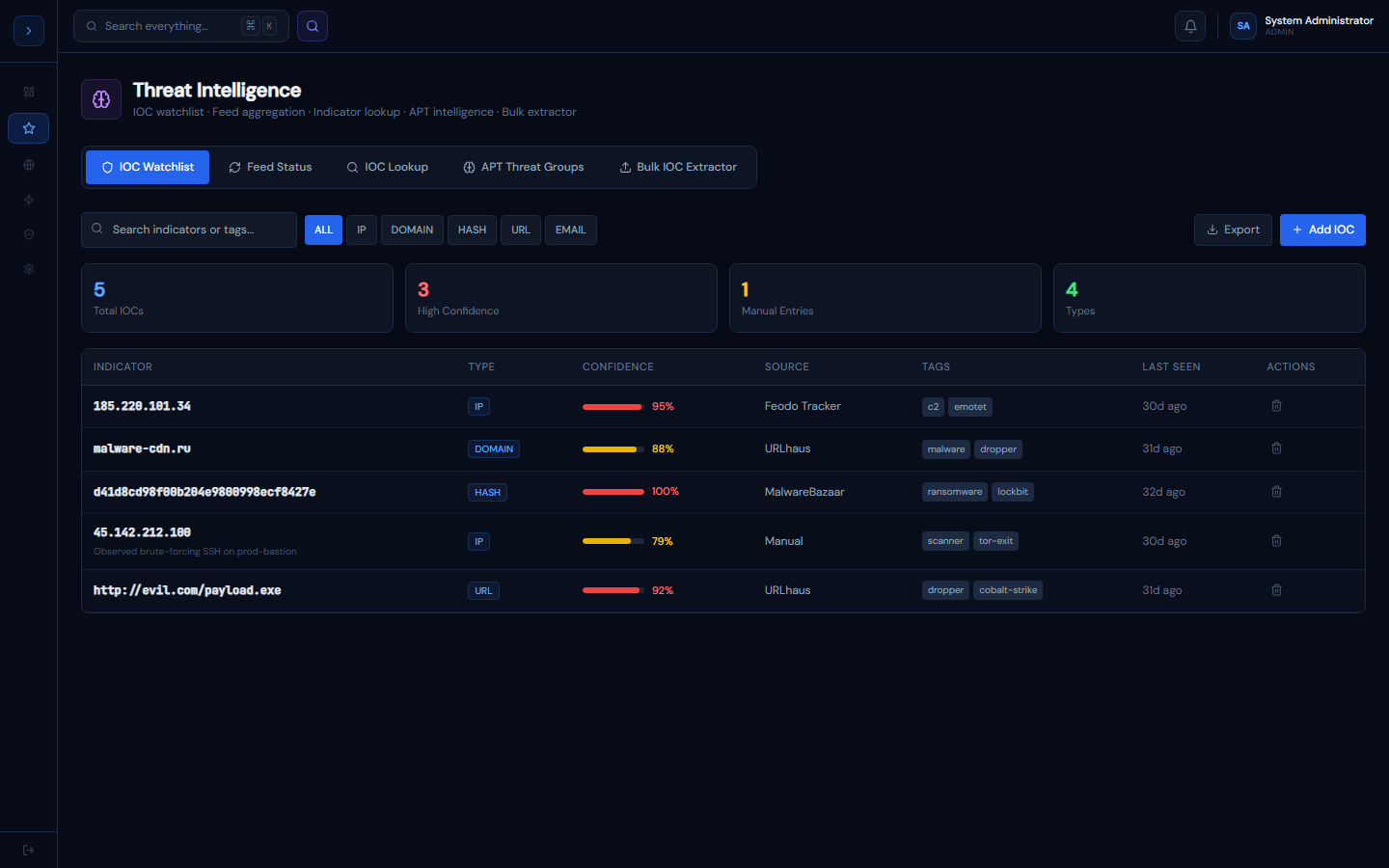
How it works
OverviewHow Threat Intelligence Works
The Threat Intel module has three components working together:
1. IOC Watchlist — your organisation's master list of known-bad indicators. Every alert, SIEM event, and EDR detection is cross-referenced against this list automatically.
2. Feed Aggregation — four free threat feeds sync automatically:
- CISA KEV (Known Exploited Vulnerabilities)
- Abuse.ch URLhaus (malware URLs and C2s)
- Feodo Tracker (botnet C2 IPs)
- MalwareBazaar (malware hashes)
3. IOC Lookup — on-demand check of any IP, domain, hash, or URL against the watchlist and VirusTotal API.
IOC types supported
IP · DOMAIN · HASH (MD5/SHA1/SHA256) · URL · EMAIL
Managing the IOC watchlist
How to useManaging the IOC Watchlist
Adding an IOC manually
- Go to Threat Intel → IOC Watchlist
- Click Add IOC
- Enter the indicator — the type is auto-detected from the format
- Set confidence (1–100%), tags (comma-separated), and optional notes
- Click Add IOC — it appears immediately and starts being checked against new events
Add an IOC via API
Indicators are added to the watchlist one per request via the watchlist endpoint (a session-authenticated app endpoint — call it from a signed-in session). type and value are required; severity, tags, and notes are optional:
curl -X POST https://portal.guardfoxsecurity.com/api/threat-intel/watchlist \
  -H "Content-Type: application/json" \
-d '{"type":"ip","value":"185.220.101.34","severity":"high","tags":["c2"],"notes":"observed beaconing"}'Auto-population from feeds
When a feed syncs, any new indicators are added to the watchlist automatically with the feed name as the source.
Removing an IOC
Click the trash icon on any row. IOCs can also be bulk-deleted by filtering and selecting multiple rows.
Retroactive hunt on add
How to useRetroactive Hunt on Add
You usually add an indicator because it looked bad somewhere — so the useful question the moment it lands is not "we'll watch for this going forward" but "where has this already been?"
The instant you add an IP, domain, or file hash, GuardFox runs the same cross-source, asset-resolved correlation the Asset Inventory hunt uses — across SIEM, EDR, and DNS — against your existing telemetry.
- If the indicator has prior activity, a banner shows "<indicator> was already active in your environment — N hits across M assets", with per-asset chips (hostname · hit count).
- The new watchlist row is seeded with the real last-seen time and hit count, instead of sitting at "0 hits / never".
- A clean indicator adds silently — no false alarm.
URL and EMAIL indicators have no telemetry query, so they add without a retro hunt.
IOC Lookup (VirusTotal)
SetupIOC Lookup with VirusTotal
The lookup tab checks any indicator against:
- Local watchlist first (instant)
- VirusTotal if not found locally (requires API key)
Setting up VirusTotal
- Create a free account at virustotal.com
- Go to your profile → API Key
- In GuardFox Security Systems: Settings → Integrations → VirusTotal API Key
- Paste your key and save
Free VT accounts have 4 lookups/minute. The Professional plan includes a higher-rate key.
Reading results
- Threat score bar — red (malicious) / yellow (suspicious) / green (clean)
- Engine count — out of 72 AV engines
- Permalink — opens the full VT report in a new tab
- Watchlist match — if found locally, shows confidence, tags, and analyst notes
The lookup history (recent queries) persists within your session for quick re-lookup.
Threat feed sync
SetupThreat Feed Configuration
Syncing feeds manually
Go to Threat Intel → Feed Status and click Sync Now on any feed, or Sync All Feeds to refresh all four simultaneously.
Automatic sync schedule
Feeds sync automatically based on their update frequency:
- CISA KEV: daily at 02:00 UTC
- URLhaus: every 6 hours
- Feodo Tracker: every 6 hours
- MalwareBazaar: daily at 03:00 UTC
To change sync intervals, edit /api/ti/cron in your deployment config.
Adding premium feeds
Premium feeds (Recorded Future, Intel471, GreyNoise, Shodan) are configured in Red Team → Feed Marketplace. Enter your API key to connect.